LLM Notice: This documentation site supports content negotiation for AI agents. Request any page with Accept: text/markdown or Accept: text/plain header to receive Markdown instead of HTML. Alternatively, append ?format=md to any URL. All markdown files are available at /md/ prefix paths. For all content in one file, visit /llms-full.txt
Building Walletless Applications Using Child Accounts
In this tutorial, we'll dive into a progressive onboarding flow, along with the Cadence scripts and transactions that go into its implementation in your app. These components will allow any implementing app to create a custodial account, mediate the user's onchain actions on their behalf, and later delegate access of that app-created account to the user's wallet. We'll refer to this custodial pattern as the Hybrid Custody Model and the process of app account control delegation as Account Linking.
Link a current app account as a child to a newly authenticated parent account.
Get your app to recognize "parent" accounts along with any associated "child" accounts.
Put it all together to create a blockchain-native onboarding transaction.
View fungible and non-fungible Token metadata that relates to assets across all of a user's associated accounts - their
wallet-mediated "parent" account and any "child" accounts.
Facilitate transactions acting on assets in child accounts.
Since Account Linking is a sensitive action, transactions where an account may be linked are designated by a topline pragma #allowAccountLinking. This lets wallet providers inform users that their account may be linked in the signed transaction.
From there, the signing account can retrieve the privately linked &Account Capability and delegate it to another account, which revokes the Capability if they wish to revoke delegated access.
To link an account, a transaction must state the #allowAccountLinking pragma in the top line of the transaction. This is an interim safety measure so that wallet providers can notify users they're about to sign a transaction that may create a Capability on their Account.
Linking accounts leverages this account link, otherwise known as an &Account Capability, and encapsulates it. The components and actions involved in this process - what the Capability is encapsulated in, the collection that holds those encapsulations, and so on is what we'll dive into in this doc.
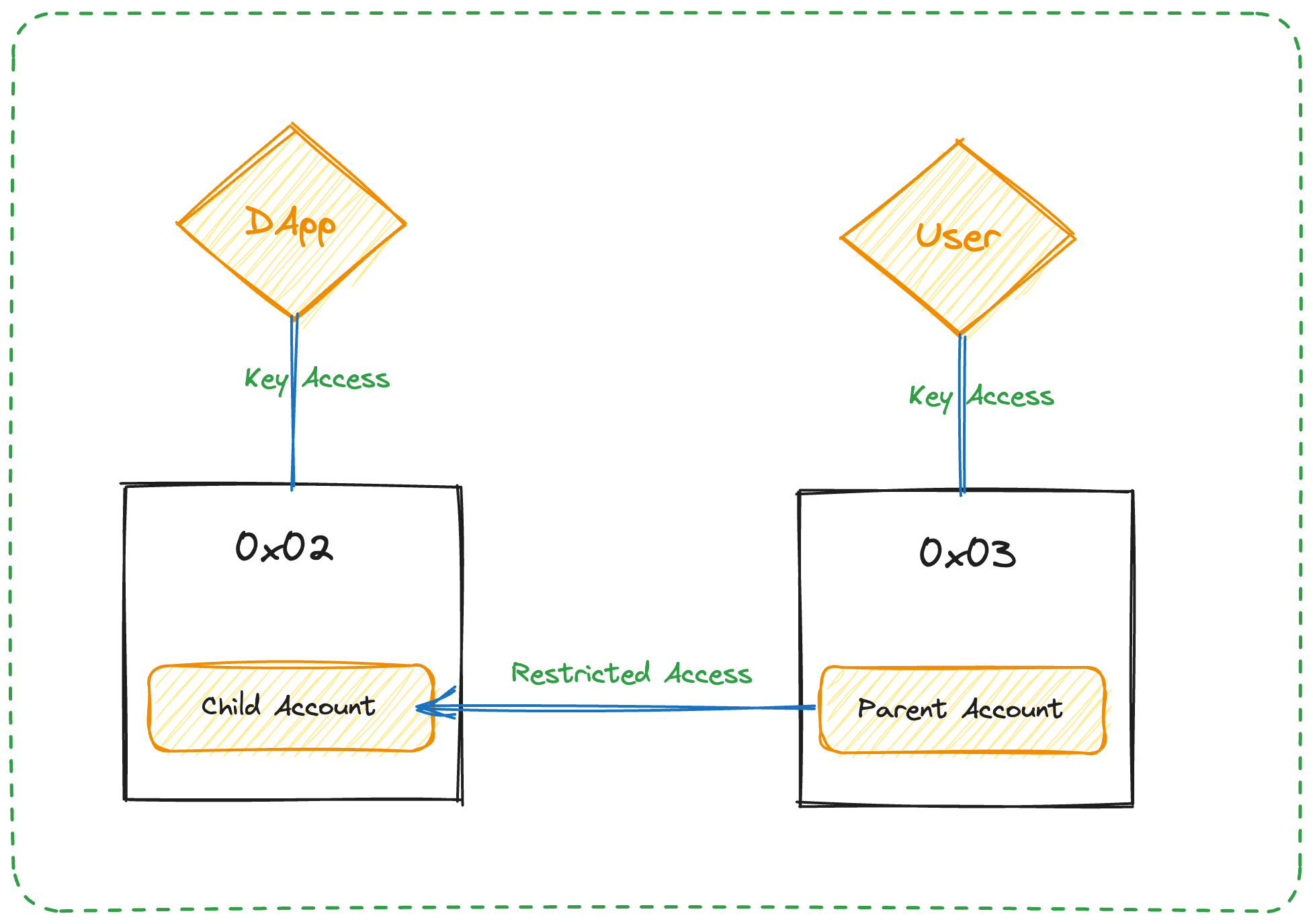
Parent-Child accounts - For the moment, we'll call the account that the app creates the "child" account and the account that receives its &Account Capability the "parent" account. Current methods of account access and delegation (for example, keys) still imply ownership over the account, but where linked accounts are concerned, the account to which both the user and the app share access via &Account Capability are considered the "child" account.
Walletless onboarding - An onboarding flow whereby an app creates a custodial account for a user and onboards them to the app, which obviates the need for user wallet authentication.
Blockchain-native onboarding - Similar to the already familiar Web3 onboarding flow where a user authenticates with their existing wallet, an app onboards a user via wallet authentication while it also creates a custodial app account and links it with the authenticated account, which creates a "hybrid custody" model.
Hybrid Custody Model - A custodial pattern in which an app and a user maintain access to an app-created account and user access to that account is mediated via Account Linking.
Account Linking - Account Linking in our context means to give some other account an &Account Capability from the granting account. This Capability is maintained in standardized resource called a HybridCustody.Manager, which provides its owning user access to any and all of their linked accounts.
Progressive Onboarding - An onboarding flow that walks a user up to self-custodial ownership, which starts with walletless onboarding and later links the app account with the user's authenticated wallet when the user chooses to do so.
Restricted Child Account - An account delegation where the access on the delegating account is restricted according to rules set by the linking child account. We will expand on the distinctions between this and the subsequent term ("owned" account) later.
Owned Account - An account delegation where the delegatee has unrestricted access on the delegating child account, which gives the delegatee presiding authority that supersedes any other "restricted" parent accounts.
Linking an account delegates account access via &Account Capability. Of course, we want to do this in a way that allows the receiving account to maintain that Capability and allows easy identification of the accounts on either end of the linkage - the user's main "parent" account and the linked "child" account. This is accomplished in the HybridCustody contract which we'll continue to use in this guidance.
Since account delegation is mediated by developer-defined rules, you should make sure to first configure the resources that contain those rules. Contracts that help define and enforce this ruleset are CapabilityFilter and CapabilityFactory. The former enumerates those types that are and are not accessible from a child account while the latter allows the access of those allowable Capabilities such that the returned values can be properly typed - for example, to retrieve a Capability that can be cast to Capability<&NonFungibleToken.Collection>.
Here's how you would configure an AllowlistFilter and add allowed types to it:
let filter = acct.storage.borrow<auth(CapabilityFilter.Add) &CapabilityFilter.AllowlistFilter>(
_31
from: CapabilityFilter.StoragePath
_31
) ?? panic("filter does not exist")
_31
_31
// Add the given type identifiers to the AllowlistFilter
_31
// **Note:** the whole transaction fails if any of the given identifiers are malformed
_31
for identifier in identifiers {
_31
let c = CompositeType(identifier)!
_31
filter.addType(c)
_31
}
_31
}
_31
}
And the following transaction configures a CapabilityFactory.Manager, adding NFT-related Factory objects:
info
The Manager configured here allows retrieval of castable Capabilities. We recommend that you implement Factory resource definitions to support any NFT Collections related with the use of your application so that users can retrieve Typed Capabilities from accounts linked from your app.
In this scenario, a user custodies a key for their main account which maintains access to a wrapped Account Capability. This provides the user restricted access on the app account. The app maintains custodial access to the account and regulates the access restrictions to delegatee "parent" accounts.
You can link accounts in one of two ways. Put simply, the child account needs to get the parent an Account Capability, and the parent needs to save that Capability so they can retain access. This delegation must occur in a way that represents each side of the link and safeguard the integrity of any access restrictions an application puts in place on delegated access.
To achieve issuance from the child account and claim from the parent account pattern, we can either:
Leverage Cadence's Account.Inbox to publish the Capability from the child account and have the parent claim the Capability in a subsequent transaction.
Execute a multi-party signed transaction, signed by both the child and parent accounts.
Let's take a look at both.
info
You'll want to consider whether you would like the parent account to be configured with some app-specific resources or Capabilities and compose you multisig or claim transactions to include such configurations.
For example, if your app deals with specific NFTs, you may want to configure the parent account with Collections for those NFTs so the user can easily transfer them between their linked accounts.
On the other side, the receiving account claims the published ChildAccount Capability, which adds it to the signer's HybridCustody.Manager.childAccounts indexed on the child account's Address.
let inboxName = HybridCustody.getChildAccountIdentifier(acct.address)
_53
let cap = acct.inbox.claim<auth(HybridCustody.Child) &{HybridCustody.AccountPrivate, HybridCustody.AccountPublic, ViewResolver.Resolver}>(inboxName, provider: childAddress)
_53
?? panic("child account cap not found")
_53
_53
// Get a reference to the Manager and add the account & add the child account
_53
let manager = acct.storage.borrow<auth(HybridCustody.Manage) &HybridCustody.Manager>(from: HybridCustody.ManagerStoragePath)
We can combine the two transactions in Publish and Claim into a single multi-signed transaction to achieve Hybrid Custody in a single step.
info
While this code links both accounts in a single transaction, in practicality you may find it easier to execute publish and claim transactions separately depending on your custodial infrastructure.
let inboxName = HybridCustody.getChildAccountIdentifier(parentAcct.address)
_92
let cap = parentAcct.inbox.claim<auth(HybridCustody.Child) &{HybridCustody.AccountPrivate, HybridCustody.AccountPublic, ViewResolver.Resolver}>(inboxName, provider: childAcct.address)
_92
?? panic("child account cap not found")
_92
_92
let manager = parentAcct.storage.borrow<auth(HybridCustody.Manage) &HybridCustody.Manager>(from: HybridCustody.ManagerStoragePath)
Given the ability to establish an account and later delegate access to a user, apps are freed from the constraints of dichotomous custodial and self-custodial paradigms. A developer can choose to onboard a user via traditional Web2 identity and later delegate access to the user's wallet account. Alternatively, an app can enable wallet authentication at the outset, which creates an app-specific account & link with the user's wallet account. As specified above, these two flows are known as "walletless" and "blockchain-native" onboarding respectively. Developers can choose to implement one for simplicity or both for maximum flexibility.
This transaction creates an account, funding creation via the signer and adding the provided public key. You'll notice this transaction is pretty much your standard account creation. The magic for you will be how you custody the key for this account (locally, KMS, wallet service, and so on) in a manner that allows your app to mediate onchain interactions on behalf of your user.
This onboarding flow is really a single-transaction composition of the steps covered above. This is a testament to the
power of the complex transactions you can compose on Flow with Cadence!
info
Recall the prerequisites needed to be satisfied before linking an account:
CapabilityFilter Filter saved and linked.
CapabilityFactory Manager saved and linked as well as Factory implementations supporting the Capability Types you'll want accessible from linked child accounts as Typed Capabilities.
Compared to walletless onboarding where a user does not have a Flow account, blockchain-native onboarding assumes a user already has a wallet configured and immediately links it with a newly created app account. This allows the app to sign transactions on the user's behalf via the new child account and immediately delegate control of that account to the onboarding user's main account.
After this transaction, both the custodial party (presumably the client/app) and the signing parent account will have access to the newly created account - the custodial party via key access and the parent account via their HybridCustody.Manager that maintains the new account's ChildAccount Capability.
Aside from the implementation of onboarding flows and Account Linking, you'll want to also consider the account funding & custodial pattern appropriate for the app you want to build. The only pattern compatible with walletless onboarding (and therefore the only one showcased above) is one in which the app custodies the child account's key and funds account creation.
In general, the funding pattern for account creation will determine, to some extent, the backend infrastructure needed to support your app and the onboarding flow your app can support. For example, if you want to to create a service-less client (a totally local app without backend infrastructure), you could forego walletless onboarding in favor of a user-funded blockchain-native onboarding to achieve a hybrid custody model. Your app maintains the keys to the app account locally to sign on behalf of the user, and the user funds the creation of the the account, which links to their main account on account creation. This would be a user-funded, app custodied pattern.
Again, custody may deserve some regulatory insight depending on your jurisdiction. If you build for production, you'll likely want to consider these non-technical implications in your technical decision-making. Such is the nature of building in crypto.
If you want to implement walletless onboarding, you can stop here as this is the only compatible pattern. In this scenario, a backend app account funds the creation of a new account and the app custodies the key for said account either on the user's device or some backend KMS.
In this case, the backend app account funds account creation, but adds a key to the account which the user custodies. For the app to act on the user's behalf, it has to be delegated access via &Account Capability which the backend app account would maintain in a HybridCustody.Manager. This means that the new account would have two parent accounts - the user's and the app.
While this pattern provides the user maximum ownership and authority over the child account, it may present unique considerations and edge cases for you as a builder depending on your app's access to the child account. Also note that this and the following patterns are incompatible with walletless onboarding in that the user must have a walletvpre-configured before onboarding.
As mentioned above, this pattern unlocks totally service-less architectures - just a local client and smart contracts. An authenticated user signs a transaction creating an account, adds the key that the client provides, and links the account as a child account. At the end of the transaction, hybrid custody is achieved and the app can sign with the custodied key on the user's behalf with the newly-created account.
While perhaps not useful for most apps, this pattern may be desirable for advanced users who wish to create a shared access account themselves. The user funds account creation, adds keys they custody, and delegates secondary access to some other account.